

User guide · features and tools · 4 min read
Your inbox, on your terms.
From My Account, click Email preferences. Three things to control: whether to receive the digest at all, which alert emails you get, and transactional-email rules.
 One switch turns the lot off. We will not email you to ask you to reconsider.
The four toggles
The email preferences panel lives on /my-garden/ (and on your member dashboard). Four on/off switches, each saves as soon as you flip it:
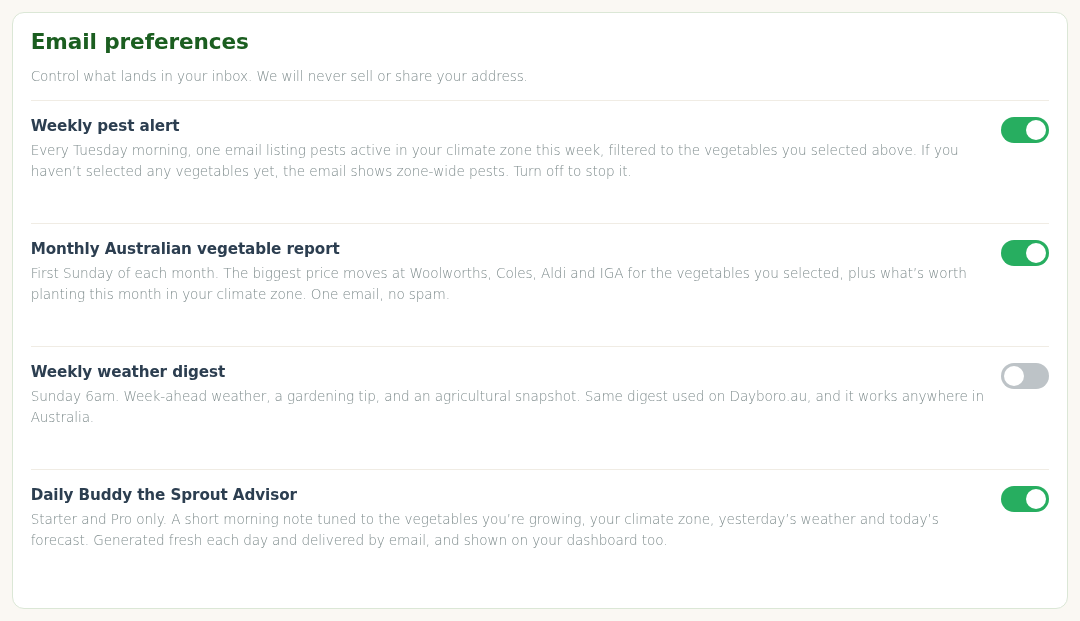
- Weekly pest alert. Every Tuesday morning, one email listing pests active in your climate zone this week, filtered to the vegetables you’ve selected. If you haven’t selected any vegetables yet, it shows zone-wide pests.
- Monthly Australian vegetable report. First Sunday of each month. The biggest price moves at Woolworths, Coles, Aldi and IGA for the vegetables you selected, plus what’s worth planting this month in your climate zone.
- Weekly weather digest. Sunday mornings. Week-ahead weather, a gardening tip, and an agricultural snapshot. Works anywhere in Australia.
- Daily Buddy the Sprout Advisor. Starter and Pro only. A short morning note tuned to the vegetables you’re growing, your climate zone, yesterday’s weather and today’s forecast. Also shown on your dashboard.
The weekly Gardener Digest itself is managed separately: every digest email carries a one-click unsubscribe link at the bottom, and clicking it stops the digest without touching the toggles above.
Tiers and defaults
| Available on | Default | |
|---|---|---|
| Weekly pest alert | All member tiers | On |
| Monthly vegetable report | All member tiers | On |
| Weekly weather digest | All tiers, including free | Off |
| Daily Buddy the Sprout Advisor | Starter and Pro | On |
A toggle outside your tier shows a “Starter+ only” tag and stays off; upgrade and it becomes available. There is no day-and-time picker, each email arrives on its own schedule listed above.
Transactional emails
These are always on, you can’t turn them off without cancelling your membership:
- Signup confirmation, immediately after signup
- Payment receipt, every charge
- Payment failure notifications, card declined, retry pending
- Pre-renewal reminders, 5 days before your card is charged (annual tiers only)
- Account security notices, password change, new login from unfamiliar device
Only the marketing / digest emails can be turned off. That’s deliberate, you need to know when your card is about to be charged, when a charge failed, and when your account is being accessed.
Other email controls
Pest alerts
The weekly pest alert email is available on every member tier, it’s the first toggle above. What Pro adds is live pest pressure: weather-triggered pest data for your postcode, including QLD fruit fly, on top of the weekly email. See live pest pressure.
Price watchlist
Starter and Pro. Pick the crops you grow and the price tools focus on them, including price-drop alerts for your crops in the weekly price email. There is no set-your-own price threshold; the watchlist follows your selected crops.
The newsletter is something else
The GardenBuddy.au newsletter is news about GardenBuddy.au itself: new features, changes to the site and the odd announcement. It carries no garden data. Your pests, prices, weather and daily advice come in the four emails above, and only there.
- You join it on its own page. Sign up at /newsletter/. Nobody is added to it because they have an account.
- It does not touch your garden emails. Joining or leaving the newsletter changes none of the four toggles, and flipping a toggle changes nothing about the newsletter.
- One exception. If you use “unsubscribe from all GardenBuddy.au emails” in one of our emails, that stops the newsletter as well. All means all.
- Leaving is one click. Every newsletter has its own unsubscribe link at the bottom, and /newsletter/ lets you check or change your subscription.
Confirming a free signup
The free weekly price alert is one of two things on the site you can sign up to without an account (the other is the newsletter, above), from the box on the home page or from the panel at the bottom of any crop page. Because there is no login involved, we have no way of knowing that the person typing an address into that box is the person who reads it. So we ask.
Signing up sends one email, subject “Confirm your GardenBuddy.au subscription”, with a single button in it. Nothing else is ever sent to that address until the button is clicked. Not the alert, not a welcome, nothing. If you never click, the signup is deleted after fourteen days and we are left holding nothing.
That also means if somebody types your address into our form, all that happens is you get one email you can ignore.
If the digest is late or missing
Signed up for the price alert but nothing arrives
Almost always the confirmation step above. Look for “Confirm your GardenBuddy.au subscription”, including in spam, and click the button in it. If the link says it has expired, the signup aged out, just sign up again.
Sunday came and went, no digest
Check spam and junk first. If there is genuinely nothing, email us, or reply to any earlier digest, and we’ll check the send log for your address.
Showed as “sent” but not in your inbox
Your email provider is filtering. Check spam/junk. Add admin@gardenbuddy.au to contacts. Gmail users: mark one digest as “not spam” to train the filter.
Want to pause for a few weeks (e.g. you’re on holiday)
Flip the toggles off, come back later and flip them on again. Your vegetable selections and the rest of your settings are untouched while an email is off.