I recorded myself using the Planner for three and a half minutes last week, no script, just Snagit running in the background and my own garden beds going down on the grid one at a time. I wasn’t planning to do anything with it. Then I watched it back and realised it explains the tool better than any page of text I could write, so here is the video, and here is everything it shows, walked through properly.
What the Planner actually is
It sits behind the Planner tab in the GardenBuddy.au app, next to Home, Explore, My Garden and Account in the left rail. On this moment it is the tool I open more than any other part of the app, because it is the only place where drawing a bed and dropping a crop into it gives you an actual dollar figure back, not a vague feeling that garlic is probably worth growing.
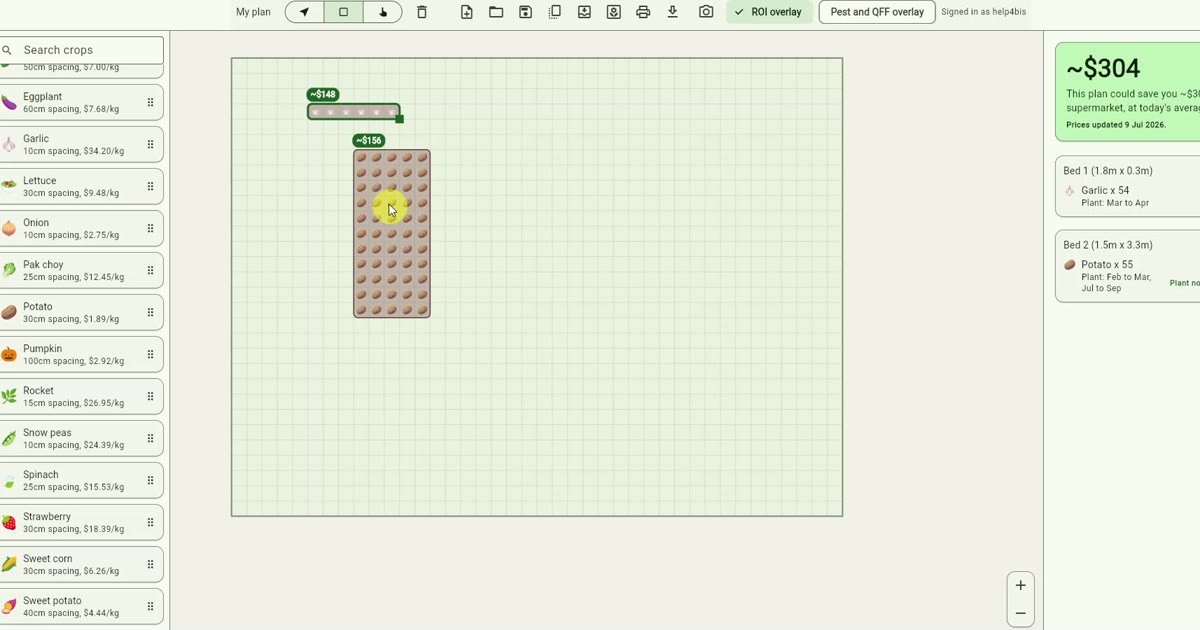
Down the left side sits a searchable list of crops. Eggplant at 60cm spacing, $7.68 a kilo. Garlic at 10cm, $34.20 a kilo, which is the one that does the heavy lifting in this video. Lettuce, onion, pak choy, potato, pumpkin, rocket, snow peas, spinach, strawberry, sweet corn, sweet potato, each with its own spacing and it’s own live price. Those prices are not typed in once and forgotten, the screen I recorded says “Prices updated 9 Jul 2026” in the corner, because they come off the same daily price tracker that runs the rest of the site.
Drawing the first bed
The video opens on an empty grid. Canvas paper background, nothing on it. I pick the rectangle tool, drag out a bed roughly 1.8m by 0.3m, and the right panel says exactly what you’d expect from a bed with nothing in it: “~$0, drop crops onto a bed to see what the plan is worth.” Fair enough.
So I drag garlic onto it. The bed fills with little bulb icons at the correct 10cm spacing for that bed size, which works out to 54 plants, and the panel updates itself before I’ve even let go of the mouse: Bed 1, 1.8m by 0.3m, Garlic x 54, worth about $148, plant window March to April. I add a second bed, 1.5m by 3.3m, drop potato into it this time, 55 plants at 30cm spacing, about $156, plant window February to March and again July to September because potato gets two windows in a subtropical climate zone. Two beds, running total, about $304. That’s the whole interaction. Draw, drop, read the number.
The number that keeps climbing
Later in the recording I got a bit carried away, which I think is worth showing rather than editing out. I drew a 6.0m by 1.8m bed, filled the whole thing with garlic at proper spacing, which comes to 1,080 plants, and watched number climb to ~$2,955 for that one bed alone. Add a second big bed at 1530 garlic plants and the running total for the plan hits $4,186, then with a bean bed and a couple of smaller potato beds thrown in, the five bed total plan sat at $4,548.
Now, before anyone screenshots that number and holds me to it: that figure is what the harvest would cost you to buy at today’s supermarket prices, not what you’ll bank, and not what turns up automatically because you drew a rectangle on a screen. Actually growing 1,080 garlic plants to maturity, keeping them fed and weeded and dug at the right time, is a completely different amount of work than dragging an icon onto a grid, and I don’t want the Planner pretending otherwise. What the number is good for is comparing crops against each other without the guesswork. Garlic at $34.20 a kilo earns its bed space in a way that, say, pumpkin at $2.92 a kilo and a full square metre of spacing per plant, mostly doesn’t, unless you’ve got room to burn.
The Pest and QFF overlay
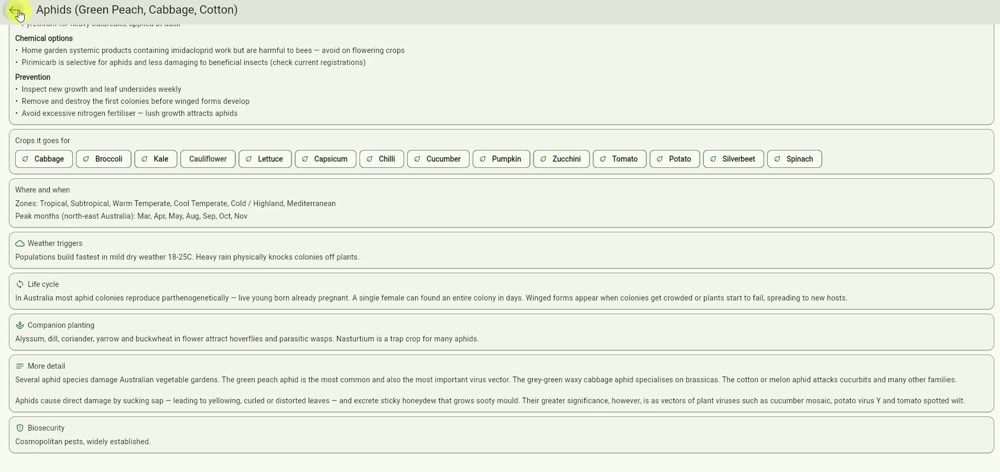
There’s a second toggle next to ROI overlay, labelled Pest and QFF overlay, and clicking it drops a detail card over whatever’s selected. Mine landed on aphids, green peach, cabbage and cotton aphid all covered in one card, and it’s a proper reference, not a one line warning. Crops it goes for: cabbage, broccoli, kale, cauliflower, lettuce, capsicum, chilli, cucumber, pumpkin, zucchini, tomato, potato, silverbeet, spinach. Weather trigger listed as mild dry weather, 18 to 25 degrees, with heavy rain physically knocking colonies off the plant. Companion planting suggestions (alyssum, dill, coriander, yarrow and buckwheat to bring in hoverflies and parasitic wasps, nasturtium as a trap crop). Chemical and organic control options both, with a genuine warning that imidacloprid is harmful to bees and should stay off flowering crops. That’s not filler content, that’s the same kind of detail I’d go looking for in a proper pest guide, sitting right there on the bed you’re planning.
From plan to real garden
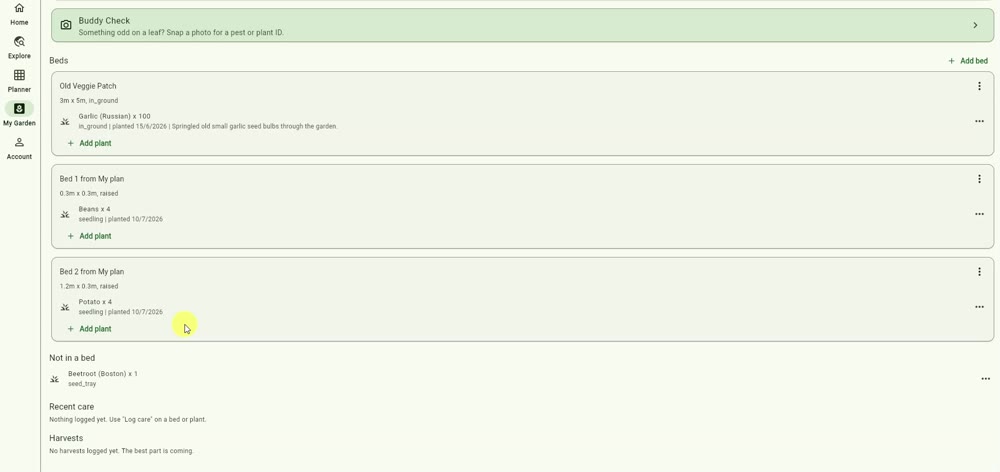
Toward the end of the video I switch across to My Garden, which is where a saved plan turns into something you’re actually tending. My own account shows the Old Veggie Patch, 3m by 5m, in ground, with Russian garlic times 100 planted on the 15th of June with a note I’d left myself: “sprinkled old small garlic seed bulbs through the garden.” Underneath it sit Bed 1 and Bed 2 from my plan, beans and potato, both logged as seedlings planted the 10th of July, plus one beetroot sitting in a seed tray with no bed assigned yet. There’s also a GardenBuddy.au Check prompt sitting above the bed list: “something odd on a leaf? Snap a photo for pest or plant ID.” I haven’t used that one in this particular clip but it’s the same photo identification the pest overlay draws its detail from.
Saving, printing, starting again
The toolbar across the top of the Planner has the boring bits that make the fun bits usable day to day: pan and draw tools, delete, new plan, open, save, duplicate, import, export, print and a screenshot icon, plus a small “Plan saved” toast that pops up along the bottom once it’s actually stuck. Near the end of the recording I hit print and it opens a real browser print dialog, my Brother sitting there as the destination, previewing an actual printable sheet with each bed’s crop list and a line at the bottom, “printed from gardenbuddy.au/app”. Whether you’re taking that to the shed or just keeping a paper copy on the fridge, it’s the same plan data, laid out flat.
What I’d tell someone using it for the first time
Start small. Draw one bed you actually have, at its real size, not the size you wish it was. If it doesn’t fill out the way you drew it, eventually you’ll need to redraw it smaller next season, so don’t fight the tool on that. Drop in whatever you were already planning to grow and read the number for what it is: what you’d pay at the supermarket for the same harvest, useful for comparing crops against each other, not a promise. Then flip the Pest and QFF overlay on before you plant, not after something’s chewed a hole in the leaf. That ordering is the one thing I’d change about how I used it in this video. I checked pests after the bed was already full, and really it wants doing first.
FAQ
Q: Is the dollar figure in the Planner guaranteed money I’ll save?
A: No. It’s what the harvest would cost you to buy at today’s tracked supermarket prices for that crop and quantity. Actual savings depend on the harvest coming off as planned, which depends on you, the weather and a fair bit of luck with pests.
Q: Where do the crop prices come from?
A: The same daily price tracker that runs the rest of gardenbuddy.au. The Planner screen shows the date they were last updated.
Q: What does QFF mean on the overlay toggle?
A: Queensland fruit fly, tracked alongside general pest pressure because it’s one of the more damaging pests for home growers in the warmer parts of the country.
Q: Do I need to be signed in to use the Planner?
A: Yes. The video shows me signed in throughout, and My Garden syncing only works against a saved account.
Have a go yourself
The Planner lives inside the GardenBuddy.au app, free to open and draw your first bed. If you’d rather see what a fuller garden setup looks like before committing beds of your own, the demo garden has one running publicly, and the features page covers everything else the app does beyond this one tool.