

User guide · running your garden · 5 min read
Every kilo you ever picked, in one table.
Every harvest you’ve ever logged, in one table, not just the totals but every individual pick with date, quantity, and quality. The kind of granular log that, multiplied across a real season, lets you compare year-over-year and spot patterns no single-season memory can.
 One season is a record. Three seasons is the thing memory cannot give you.
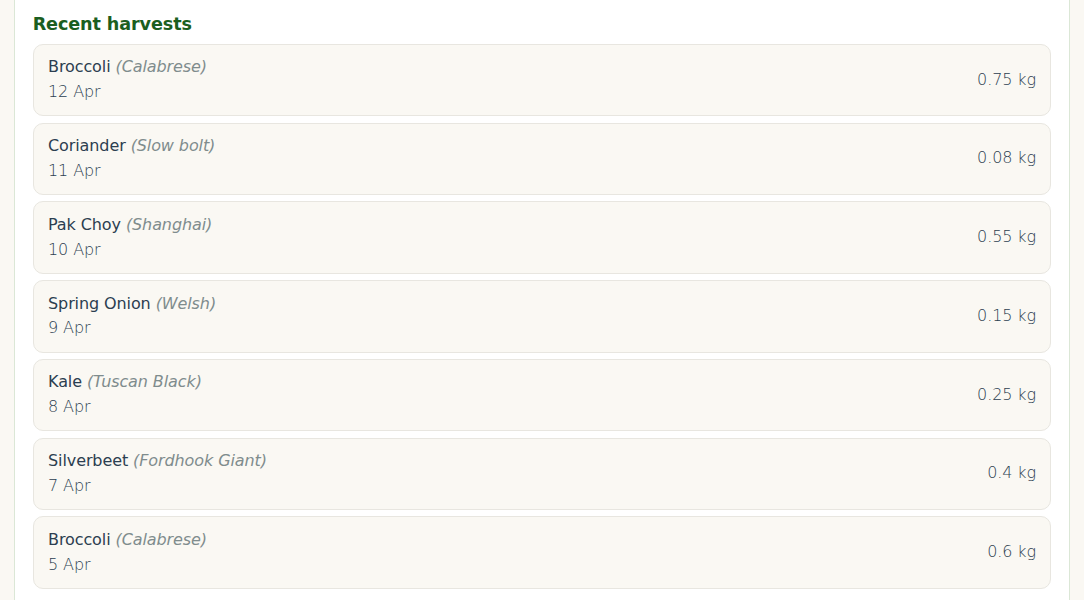
The columns
| Column | Shows |
|---|---|
| Date | When you harvested |
| Plant | Plant name (e.g. “Broccoli”) |
| Location | The bed or spot it came from |
| Quantity | The amount and unit exactly as you entered them (e.g. 450 g, 2 bunches) |
| Quality | The quality rating you picked when logging (e.g. Excellent, Good) |
| Notes | Any free-text notes from the harvest form |
Sort order
The table is sorted by date descending, newest at the top, so your most recent picks are always the first thing you see. It is a plain table: there are no click-to-sort headers and no filter box on the page. If you want to slice the history by crop, bed or keyword, export it as a CSV (Pro, see below) and filter it in a spreadsheet.
Working out totals per crop
The history page does not add up totals for you. To get per-crop totals for a season, export the CSV (Pro) and drop it into Google Sheets or Excel: a pivot table on the plant column gives you total quantity, number of harvests and average per pick in a minute or two.
The average-per-pick number is the useful one for planning. If your broccoli averages roughly 500 g per pick and you want 1 kg a week, you need two picks a week, which means enough plants that two heads are ready on consecutive days.
Export (Starter and Pro)
On Pro, the Export your data section at the bottom of /my-garden/ has a Download harvests CSV button that saves your full harvest history as a CSV file. Useful for:

- Archiving end of season. Download, rename to “autumn-2026.csv”, keep locally.
- Custom analysis. Paste into Google Sheets or Excel for charts, pivot tables, moving averages.
- Backup before pulling plants. When you archive a plant, its harvest records stay but feel more secure with an off-site copy.
- Sharing with a cooperative. If you’re in a seed-saver or swap network, sharing harvest data helps the group plan collective plantings.
CSV format
date,plant,variety,bed,quantity,unit,quality,market_value,destination,notes
2026-04-12,Broccoli,Calabrese,Front raised bed,450,g,excellent,4.50,kitchen,First pick of season
2026-04-15,Silverbeet,Fordhook Giant,Front raised bed,1,bunch,good,3.80,kitchen,Outer leaves
...
The history shows everything you’ve logged since you joined. After 12 months you’ll start seeing season-over-season patterns, last autumn’s kale harvest was heavier than this autumn’s; broccoli performs better in the front bed than the back. Keep logging.
Archiving vs deleting
When a plant is finished (pulled out, gone to seed, dead), mark it archived rather than deleted. Archived plants stop appearing in your active list, but their harvest history stays in the record.
Delete only:
- Genuine duplicates (you accidentally logged the same harvest twice)
- Test entries from when you were learning the system
- Entries where you realised the crop or weight was wildly wrong and you’d rather not see it in the record
Historical data has value even when imperfect, one season’s less-than-optimal harvest is useful context for next season’s planning. Only delete when you’re confident the record shouldn’t exist.
Year-over-year comparison
After 12+ months of consistent logging, the real value of the harvest history emerges, you can compare this autumn’s crop to last autumn’s at the individual crop level. Our demo garden’s first year of data is about to enable this for that plot.
Things you can compare year-over-year from the history:
- Total kg per crop per season
- First-harvest date vs expected (earlier or later than last year?)
- Peak harvest week
- Season length (first-to-last harvest)
- Quality distribution (more Excellent/Good ratings this year?)