GardenBuddy.au’s growing guide library covers 104 vegetables across all seven Australian climate zones, and every page is free to read with no account needed. It starts at gardenbuddy.au/veggie-guide/. Here is what the library actually contains and how the team built it to find your crop.
A minute and a half on what the growing guide library covers and how to find your crop in it.
What the library actually is
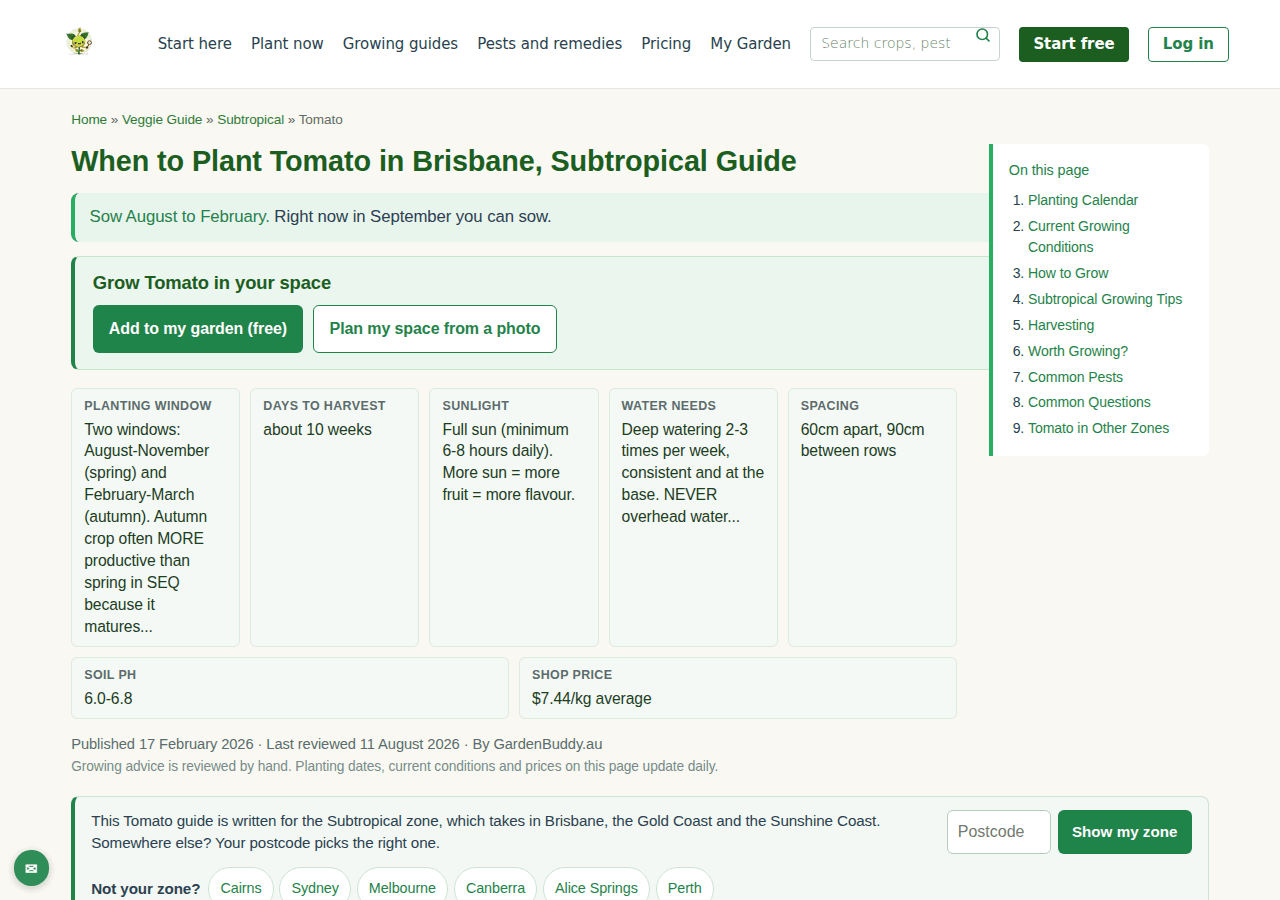
This is not one post for each vegetable. It is a set of pages generated from the team’s own growing data, one page for every combination of crop and climate zone, at /veggie-guide/{zone}/{crop}/. Tomato in the Subtropical zone lives at gardenbuddy.au/veggie-guide/subtropical/tomato/, and the same crop has its own separate page for each of the other six zones, because a Brisbane tomato and a Hobart tomato do not sow on the same month.
The index page groups the seven zones with the towns each one covers: Tropical (Darwin, Cairns, Townsville), Subtropical (Brisbane, Gold Coast, Dayboro), Warm Temperate (Sydney, Perth, Adelaide), Cool Temperate (Melbourne, Canberra, Hobart), Cold Highland (the Snowy Mountains, alpine Tasmania), Arid and Semi Arid (Alice Springs, Kalgoorlie), and Mediterranean. Pick the zone nearest your town, or enter a postcode on any crop page and it switches for you.
Why it matters
Most growing advice on the internet was written for England or Ohio, and following it here is how a Brisbane grower ends up with bolted lettuce in October. Every guide in this library starts from an Australian zone, not a generic northern hemisphere calendar, so the planting window on the page is the one that actually applies to where you live.
It also is not a static leaflet. Each crop page reads a live soil temperature figure off GardenBuddy.au’s own weather station at Dayboro, in South East Queensland, and shows a ready to plant tick when that figure sits inside the crop’s optimal range. Tomato’s page in the Subtropical zone, checked while writing this, showed 20.9°C against an optimal range of 18 to 30°C. That number moves with the weather, it is not typed in once and forgotten.
How to use it
- Start at the index: open /veggie-guide/ and pick your climate zone from the seven cards, or enter your postcode on any crop page and every guide on the site opens to your zone from then on.
- Read the key facts first: planting window, days to harvest, sunlight, water needs, spacing, soil pH and today’s supermarket price sit in a row at the top of every crop page, before the body text.
- Follow the planting calendar: a month by month table below the key facts marks which months suit a seed tray, a direct sow, or nothing at all for that crop in your zone.
- Check the pests and questions sections: further down, the page lists the pests actually likely in your zone with a risk score, plus a short FAQ answering things like which zone you are in and whether the crop grows all year round.
- Jump zones or crops without searching again: every page ends with links to the same crop in the other six zones, plus a handful of related vegetables worth growing alongside it.
Frequently asked questions
Do I need an account to read a guide? No. Every crop and zone page is public. A free GardenBuddy.au account is only needed if you want to add the crop to your own garden tracker or use the interactive planting dashboard.
How is this different from the weekly digest email? The library is the reference you search when you already know what you want to grow. The weekly digest is the opposite direction, it tells you what is worth planting right now without you having to ask.
What if I do not know my climate zone? The index page describes each of the seven zones by the towns it covers, and any crop page will set your zone from a postcode. The Grow Zone Map is the visual version of the same lookup.
Does the price shown on a crop page update? Yes. The shop price figure on each guide comes from the same price tracker GardenBuddy.au runs across the major supermarkets, not a number typed in once.
Related features
The growing guide library sits alongside a few other GardenBuddy.au tools that use the same underlying data.
- Reading a per veggie page: a closer look at everything on one crop page, for anyone who wants the full walkthrough rather than the summary above.
- Grow Zone Map: the visual way to find which of the seven zones your own town sits in.
- The weekly digest: a standing email pulled from the same planting data, sent once a week instead of searched for.
- Veg price tracker: the same live supermarket prices shown on every crop page, on their own page across every vegetable at once.
Try it now
Open the growing guide library, pick your zone, and search for the crop you are planting next. Reading a guide costs nothing and needs no account. Join GardenBuddy.au free if you want that crop tracked against your own garden.