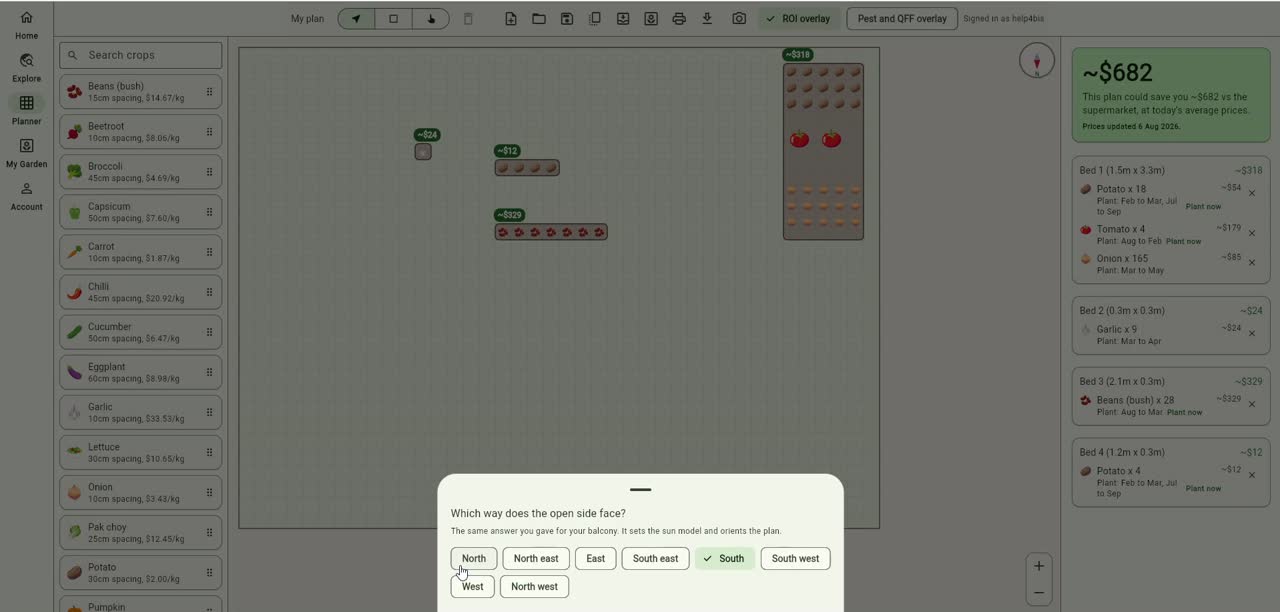
There is now a compass in the bed planner. Small thing, top right corner of the canvas. It took us longer to explain why we needed it than it took to build it.
What it actually is
A dial that sits over your plan and points at north. You tap it, you pick one of eight directions, north, north east, east, south east, south, south west, west, north west, and the map turns to match. That is the whole feature. On the video you can see it done in about five seconds.
Until last week the planner let you draw beds, drop crops in them and told you what the lot was worth against supermarket prices, all of which is useful, but it drew every garden on a blank rectangle with no idea which edge caught the morning sun. So you could plan a bed perfectly and still put your corn where it shades everything behind it for the back half of the year.
By default the map now assumes north is up, the same as every other map you have ever read. If that is wrong for your patch, one tap fixes it.
Why north matters more here than the internet thinks
Most gardening advice online is written in the northern hemisphere, and it quietly assumes a south facing wall is the warm one. Here it is the exact opposite. In Queensland the sun sits in the northern half of the sky all year, so a north facing fence is your sunny side and a south facing one is where things sulk. We have read a lot of otherwise good advice that gets this backwards for us, and if you follow it you will put your heat lovers in the coldest corner you own.
The second thing is that the sun does not sit still. At Dayboro, roughly 27.2 degrees south, the noon sun is 39 degrees above the horizon at the June solstice and 86 degrees at the December one. That is a calculation, not a measurement, but it is a simple one and you can feel the result in the garden.
The same 2 metre fence, same spot, six months apart:
- 21 June, sun 39 degrees up, shadow reaches 2.44 m into your bed at midday
- 21 December, sun 86 degrees up, shadow reaches 13 cm
- Equinox, sun 63 degrees up, shadow about 1 m
Worked out from the solar declination for those dates at 27.2 degrees south. Your latitude shifts the numbers a bit, the shape of the problem does not change.
Two and a half metres is most of a bed. That is the difference between winter lettuce that works and winter lettuce that sits there doing nothing for eight weeks, and it is entirely decided by which way your fence runs. The planner could not help you see that before, because it did not know which way anything was pointing.
What you do with it
Once the map is oriented, a few decisions stop being guesswork:
- Where the tall stuff goes. Corn, climbing beans, staked tomatoes and a trellis all cast a shadow. Put them on the southern side of a bed and they shade the ground behind them for most of winter. On the northern side they shade almost nothing.
- Which bed gets the salad. Lettuce, rocket, pak choy and coriander are the crops that bolt when they cook. In a Dayboro January the bed that catches afternoon western sun is a different proposition to the one that gets it in the morning, and now you can tell which is which at a glance.
- Where the winter beds go. Anything you want producing between May and August wants the spot that stays out of the fence shadow. That spot moves. See the 2.44 m above.
- What the fence, the shed and the neighbour’s mango tree are doing to you. The compass does not know about them, but you do, and an oriented map makes it obvious which side of your plan they sit on.
Ground gardens and balconies get asked different questions
If you garden on the ground, tapping the compass asks you which way the top of your map faces. Easiest way to answer it: stand at your house, look at the garden, and the direction you are facing is the top of the map. That turns the compass and nothing else. Your sun figures do not move.
If you told us you are on a balcony, you get a different question, which way the open side faces, and it is the same answer you already gave when you set your space up. On a balcony that number does real work. It feeds the sun model, because a balcony has a wall behind it, usually a slab overhead and often walls at both ends, and those three things decide how much light ever reaches your pots. That is the video you are watching, by the way. Our test garden is set to balcony, which is why the question you see there is worded for a balcony and not for ground.
Not signed in, or you have not made a garden yet? You still get a compass. It just keeps your choice for the session rather then remembering it, and the sheet says so plainly instead of pretending.
What it does not do, so nobody is surprised
We would rather say this now than have someone find it out annoyed. The compass turns the map. It does not yet redraw your beds, it does not rotate what you have already placed, and for a ground garden it does not change any sun hours we calculate. On a balcony the aspect does drive the sun model, and it already did that before this compass existed, we just never showed it to you on the plan.
The next piece is balcony sizing, so the canvas is your actual balcony rather then a 12 by 9 metre paddock that no balcony has ever been. Eventually we want the shadows drawn on the map itself, so you can see the winter fence line instead of doing the trigonometry in your head. That one is not so easy and we are not going to promise a date.
Where to find it
Open the app, click Planner in the menu, and look at the top right of the grid. It is on the Planner tab only, not the home screen. We mention that because the first person we showed it to went to the app, stayed on the home screen and told us it was missing. Fair enough, and our fault for not saying where to look.
If you have used the planner before and the compass is not there, reload the page properly. The app caches itself so it loads fast and sometimes it hangs onto the old version for a bit.
Have a go with it now
The planner is open to everyone. No account needed to draw beds, drop crops in and watch the dollar figure move. There is a demo plan loaded so you are not starting at a blank grid.
A free account keeps your garden, gives you the live veg prices, the 3 month trend chart, both weekly emails and a journal to record what you actually planted. That covers a lot of people and it costs nothing.
Saving a plan you built, and having it there next season to check what you grew where, is a Starter feature at $3.99 per month or $29 per year. Pro is $7.99 per month or $59 per year. For most people the honest answer is that Free plus one season of using the planner tells you whether the paid tier is worth it, and we would rather you worked it out that way than took our word for it.
Open the plannerSee what is in each planSet your growing space
If you are on a balcony, do the growing space setup first. The compass is worth more to you than to anyone gardening on the ground, because on a balcony the aspect is not decoration, it is most of the answer to what will grow out there at all.
GardenBuddy.au, built for subtropical vegetable growing at Dayboro, QLD. More about the project.
Published 7 August 2026. Last updated 25 September 2026.