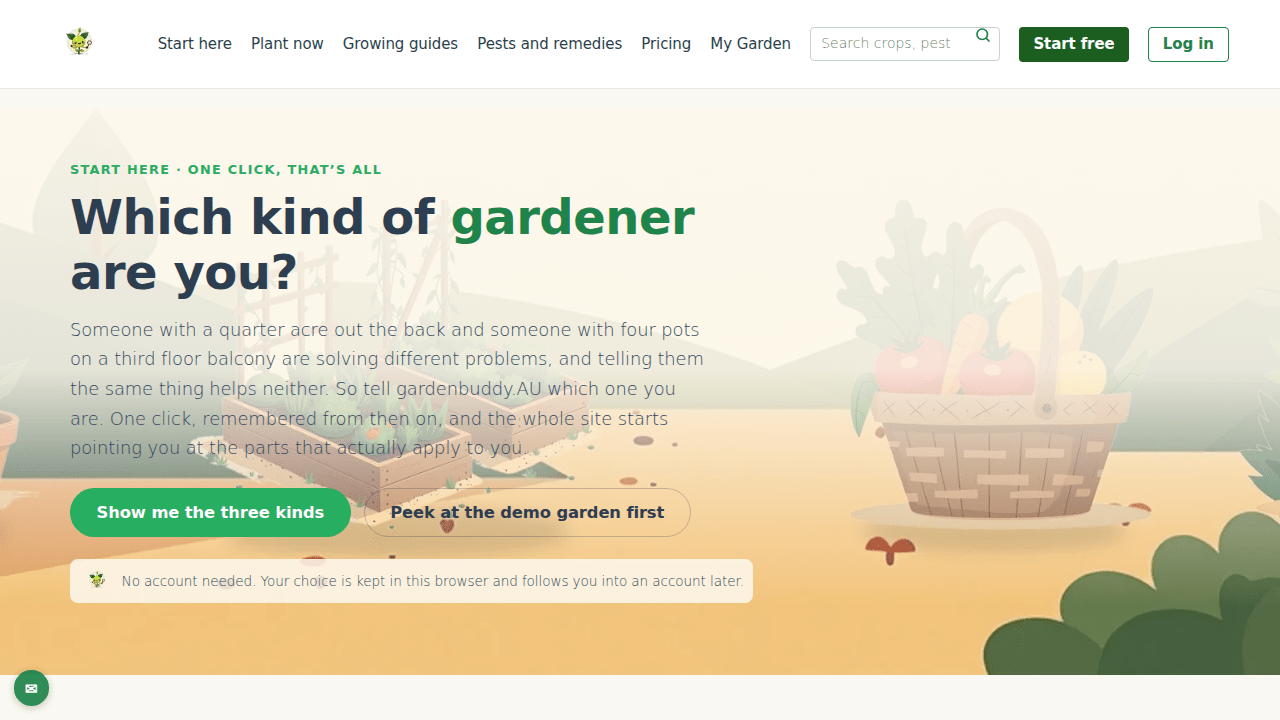
GardenBuddy.au’s Which kind of gardener are you? picker is the first thing most people see on the site. One tap tells GardenBuddy.au whether you garden in a backyard, on a balcony, or with other people, and the rest of the site adjusts to match.
A minute and a bit on the picker: what it asks, what each answer unlocks.
What it actually is
It is not a quiz with a string of questions. It is one screen, three cards, one tap. The page itself says as much right at the top: “Start here, one click, that’s all.” Pick backyard, balcony, or community and GardenBuddy.au shows you a five step path built for that answer.
Why it matters
A quarter acre out the back and four pots on a balcony are different problems. A backyard grower needs bed layout and companion planting. A balcony grower needs to know their light and their pot depth before anything else, because light, floor space and weight are the real limits up there. A community grower needs to find a group and check everyone in it shares a climate zone before anyone plants a thing. Sending all three down the same path wastes their time. The picker exists so GardenBuddy.au can point each one straight at what actually applies to them.
How to use it
- Open the page: go to gardenbuddy.au/who-are-you/. An older link,
/start-here/, redirects straight here, it is the same page under a retired address. - Pick a card: backyard, balcony, or community. Whichever sounds most like you.
- Follow the five steps: each journey lists five ordered steps with its own links, from setting up your first bed or pot through to logging a harvest.
- Not sure, or a bit of both: the page has a fallback section for a patch and a balcony together, a community garden plus a home patch, or not having started yet, that last one points at the demo garden.
- Change your mind any time: a “clear it” option resets your answer. All three cards stay visible, nothing about the pick is permanent.
What the answer changes
Choosing a card does real work behind the scenes, not just cosmetic swapping:
- Before you have an account: the choice is stored in your browser, a cookie that lasts a year, so it is remembered next time you visit.
- Once you sign up: that stored choice carries straight across into your new account automatically.
- If you are already a member: your pick is saved to your account and used to personalise the rest of the site.
- Your garden type: GardenBuddy.au will set it from your answer, but only if you have not already set one up yourself. A garden you have already configured is never overwritten.
- Community, specifically: picking community sets you up on ground or balcony as normal, and separately flags that you are interested in growing with other people, which steers you toward Grow Together, the invite-only group feature.
Frequently asked questions
Do I need an account to use it? No. Anyone can pick a card and see the journey for it. An account is only needed once you want to actually save a garden or a plan.
Is this a personality quiz? No. It is one tap, not a series of questions. GardenBuddy.au is not profiling you, it is routing you to the right tools.
Can I change my answer later? Yes, any time, using the reset option on the same page.
Does picking community mean I lose my backyard or balcony setup? No. Community sits alongside ground or balcony, it does not replace it.
What if I already built a garden before answering? GardenBuddy.au will not touch it. The picker only fills in a garden type when none has been set yet.
Related features
- The starter plan: the backyard journey’s own first step, one lawn photo turned into a full week-by-week garden plan.
Try it now
Head to gardenbuddy.au/who-are-you/, tap the card that sounds like you, and let the GardenBuddy.au team point the rest of the site at what actually fits your space.