Say you want carrots in the ground this week. You know GardenBuddy.au has a Moon Calendar. What you actually do with it, day to day, is a different question. Here is the real walkthrough, using the live calendar as it stood when we checked it.
A minute and a bit on picking a planting day, not just reading the calendar.
What this walkthrough covers
This is not another explainer of what the Moon Calendar shows. That already exists, see the Moon Calendar and Biodynamic Calendar guides. This post is the decision itself: carrots, this week, which day, and what actually gets in the way of a straight answer.
Why it matters
Knowing a feature exists is not the same as knowing how to use it under time pressure. A gardener with a punnet of carrot seed and a free Saturday does not want a lecture on lunar phases, they want to know if today is worth planting or if they should wait three days. Walking through one real decision beats reading a feature list.
How to use it, step by step
1. Check today’s card first
Open gardenbuddy.au/moon-calendar/ and read the top card before scrolling anywhere. On the day we checked, it read Waxing Gibbous, moon in Sagittarius, tagged as a fruit day, best for tomatoes, squash, melons and corn. Carrots are a root crop, so that card alone told us today was not the day.
2. Scroll the month grid for a root day
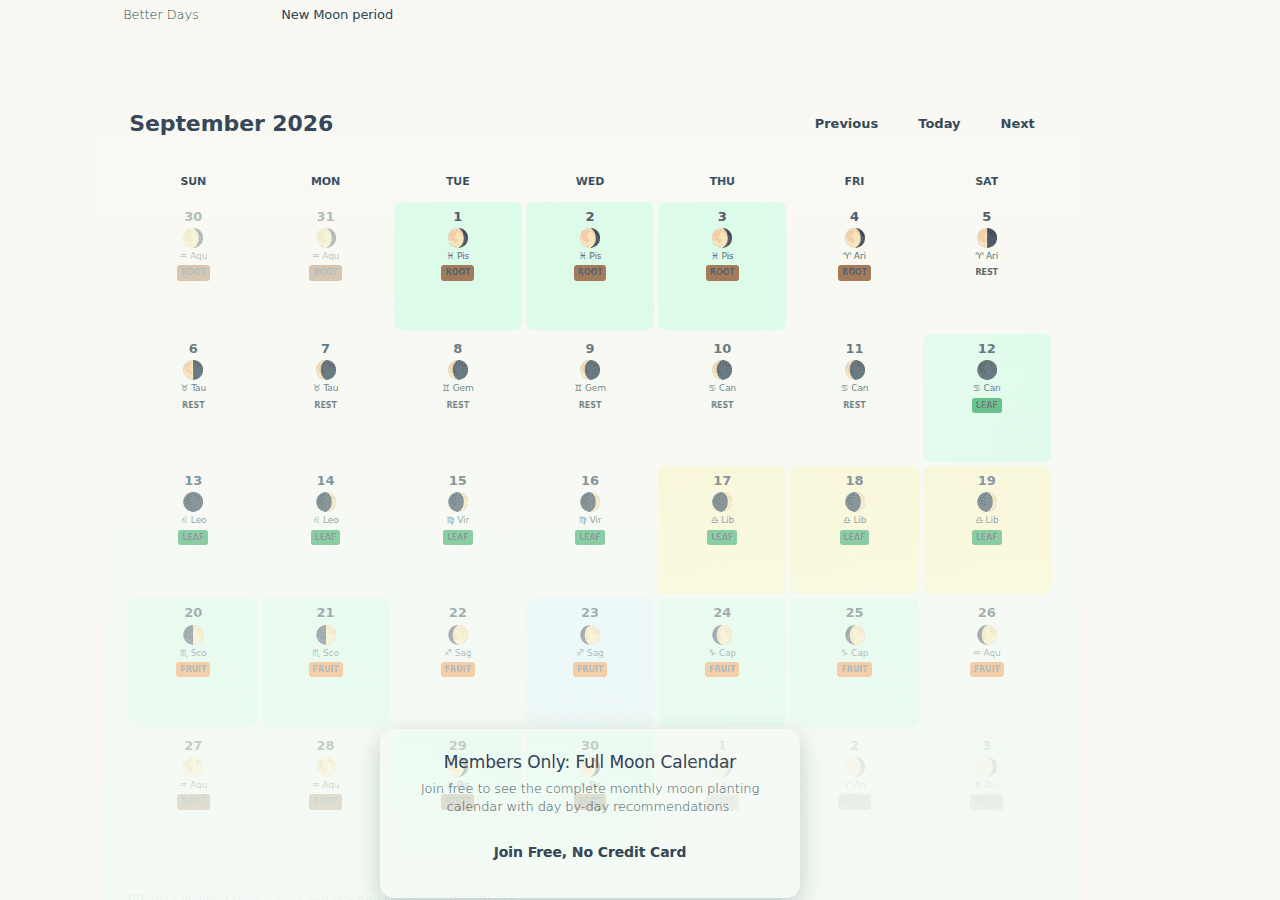
Each day in the grid carries a small tag, fruit, root, leaf or rest. On the day we checked, the whole run from the 20th through the 26th was tagged fruit. The tag flipped to root starting the 27th, the day of that month’s full moon, and stayed root for several days after. That is the window worth waiting for if today’s card does not match your crop.
3. Watch for the join prompt on the last row
Here is the bit a feature list would not tell you. The free, logged out view of the grid shows almost the whole month clearly, but the last visible row sits under a “Join Free, No Credit Card” prompt layered on top of it. On the day we checked, that happened to be exactly the row holding the root days we wanted, the 27th through the 30th. If the day your crop needs falls in that last row, joining free unlocks it cleanly, and it costs nothing and asks for no card.
4. Cross-check the crop against the schedule card
Further down the page, the Biodynamic Planting Schedule lists carrots by name against the Full Moon to Last Quarter window, alongside potatoes, onions, garlic, beetroot and radishes. That is the same waning stretch the day grid’s root tag is built from, so the schedule card and the grid agree with each other. Seeing carrots named on the page, not just implied by a colour, is worth checking before you commit.
5. Do not try to reverse engineer the tag yourself
The page also shows a Zodiac Signs and Planting Elements legend, fire and earth signs paired with fruit or root, water and air signs paired with leaf or flower. It is tempting to use that legend to predict a day’s tag yourself. On the day we checked, the moon was in Aquarius, which the legend lists as air, flower, on a day the grid tagged root. The phase clearly carries more weight than the sign in the actual calculation behind the tag. Read the tag on the day, do not do the arithmetic in your head.
The five-minute version
- Open the calendar, read today’s card. Matches your crop? Plant today.
- Doesn’t match? Scroll the grid for the nearest day with the right tag.
- Land in the last row of the month? Join free, no card, to see it clearly.
- Want a second opinion on the crop? Check the Biodynamic Planting Schedule card further down for your crop by name.
- Don’t try to calculate the tag from the zodiac legend, the grid has already done it.
Frequently asked questions
Does this only work for carrots? No, the same five steps apply to any crop. Swap “root” for “fruit” or “leaf” depending on what you are planting, and read the matching tag.
Do I have to join to use this at all? No. Today’s card, the current month’s grid outside its last row, the zodiac legend and the free printable PDF are all open without an account. Joining only matters when your target day falls in that gated final row, or when you want the full day by day grid past the current month.
What if today’s tag and the schedule card seem to disagree? On the page as we checked it, they did not, carrots appeared under the same waning window the day tags used. If you ever see a mismatch, trust the day grid for that specific date, it is the more granular of the two.
Related features
- The Moon Calendar: What It Shows and How to Use It: the full feature explainer, for background on illumination, moon age and the phase card.
- The Biodynamic Calendar: What It Covers and How It Differs From the Moon Calendar: the longer view of the same lunar logic, month by month rather than day by day.
- Grow Zone Map: a good root day is only useful if a root crop actually suits your climate this week, check your zone alongside the calendar.
Try it now
Head to the Moon Calendar, read today’s card, and see whether your crop matches. If it does not, scroll for the nearest day that does, and join GardenBuddy.au free if that day is hiding behind the prompt.