
User guide · running your garden · 5 min read
A pot on the balcony counts as a bed.
A bed in GardenBuddy.au is any growing area, a raised bed, a spot in the ground, a pot on the balcony, a greenhouse row. The system tracks each one separately, so every plant has somewhere to live and you can compare how the same crop does in different spots.
 You do not need to measure anything precisely. A rough size is enough to start.
Where the button is
Open /my-garden/ and scroll to the section headed Your garden. Along the top of it sits a row of four buttons:
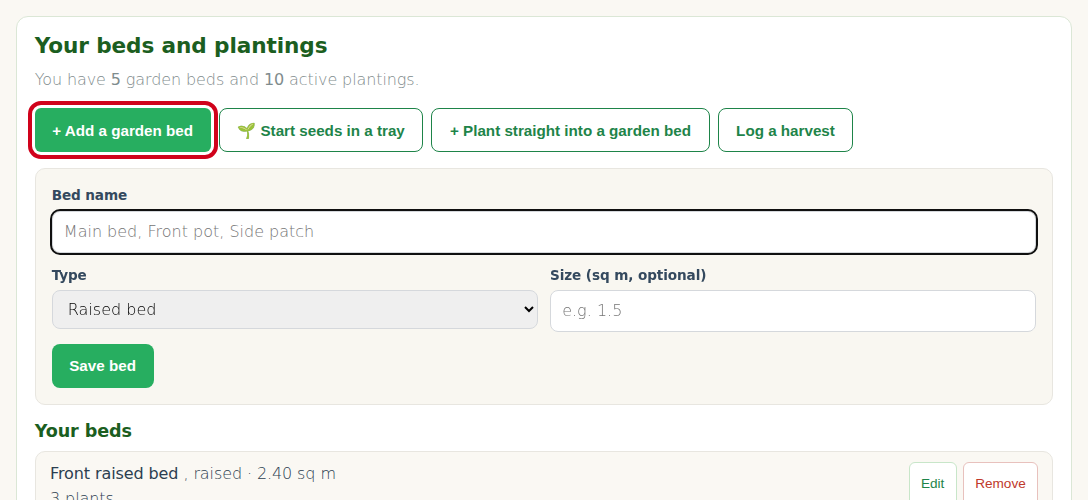
- + Add a garden bed, the one you want here
- Start seeds in a tray, for seed you have sown but not planted out
- + Plant straight into a bed, for seedlings going in the ground today
- Log a harvest, for anything you pick
Click + Add a garden bed and a short form opens underneath. Nothing is saved until you press the button at the bottom of it, so you can open it just to look.
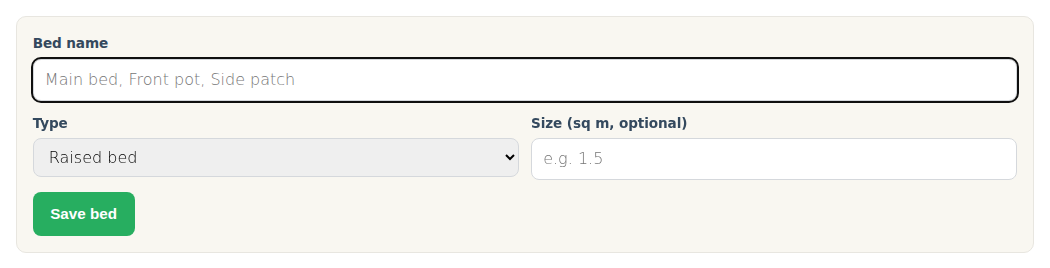
The three fields explained
| Field | Required? | What it’s used for |
|---|---|---|
| Bed name | Yes | Shows up as a dropdown in every other form, planting and harvesting both. Pick something specific. “Front raised bed” beats “Bed 1”. |
| Type | No, defaults to Raised bed | Raised bed, In ground, Pot / container, or Greenhouse / glasshouse. Worth setting honestly, because a pot dries out two to three times faster than the same crop in the ground. |
| Size (sq m) | No | Optional, and useful later rather than now. With a size on the bed the system can work out yield per square metre, which is the number you want when you are deciding whether to build another one. |
Older versions of this guide described a separate location box. There isn’t one. If position matters to you, put it in the name: “Raised, back fence” or “Pots, front step”. The name is what you will be reading in dropdowns for the next year, so it may as well carry the useful bit.
Common bed sizes for reference
Only if you want to fill in the size field. Measuring with a tape takes about 30 seconds and beats guessing, but an estimate off this table is fine.
| Bed type | Typical dimensions | Square metres |
|---|---|---|
| Standard suburban raised bed | 1.2 m × 2.4 m | 2.88 |
| Half size raised bed | 0.9 m × 1.8 m | 1.62 |
| Wicking bed | 1.0 m × 2.0 m | 2.00 |
| VegePod (small) | 1.0 m × 1.0 m | 1.00 |
| VegePod (medium) | 1.0 m × 2.0 m | 2.00 |
| Standard 25 cm pot | circular 25 cm | 0.05 |
| Half wine barrel | circular 60 cm | 0.28 |
| Trough planter (1.2 m) | 0.3 m × 1.2 m | 0.36 |
| Grow bag (large) | circular 40 cm | 0.13 |
Step by step
- Open /my-garden/ and scroll to Your garden.
- Click “+ Add a garden bed”. The form opens below the buttons.
- Type a bed name. Something you will recognise in a dropdown six months from now.
- Pick a type. Closest match is good enough. A wicking bed can go in as Raised bed, the difference does not change anything the system calculates.
- Size in square metres, if you want it. Leave it blank and nothing breaks.
- Click “Save bed”. The bed appears straight away in the list underneath, with Edit and Remove next to it.
How many beds to start with
Add only the beds you actually grow in right now. Do not pre create “future expansion bed 3”. You will forget it exists and it will sit in every dropdown you use.
On the free plan you get one bed and ten plants, which is enough to see whether the journal suits you. Starter and Pro lift both limits.
Suburban backyard
- 1 raised bed at the back
- 1 in ground patch along a fence
- 2 or 3 pots for herbs
- Total: 3 to 5 beds
Apartment or balcony
- 1 container or trough named “Balcony”
- Total: 1 bed
Acreage or serious hobbyist
- 3 to 6 raised beds in different positions
- 1 large in ground main patch
- 1 greenhouse
- 2 to 4 pots for raising transplants
- Total: 7 to 12 beds
Just experimenting
- 1 pot or grow bag
- Total: 1 bed
Editing or removing beds
Every bed in the list carries its own Edit and Remove buttons. There is nothing to hover over and nothing hidden.
- Edit opens the same three fields inline. Change the name, type or size and save. Plants attached to the bed stay attached.
- Remove deletes the bed. It is not an archive and there is no undo, so read the next paragraph before you use it.
If the bed still has active plants in it, Remove refuses and tells you how many are in the way. Take the plants out first, or move them to another bed with Edit on the plant.
Once the bed is empty of active plants it deletes for real. Harvests you already logged are not deleted with it, they stay in your history.
Be careful how you empty it though. If you Remove the plants to clear the way, those plants’ harvests lose their crop name and stop being counted in dollars. Move the plants to another bed with Edit instead, or set them to Harvested. There is more on this in Log a harvest.
Common mistakes
One bed called “the whole garden”. The reason beds are separate is so you can see that the front bed out grows the back one. Lump them together and that comparison is gone.
Beds you have not built yet. They clutter every dropdown and you lose track of which ones exist in the real world.
The same name twice. Two beds called “Raised bed” is a coin toss every time you log a harvest. Put the position in the name.
Naming a bed after what is in it. “Kale bed” stops being true the moment you pull the kale out. Name it for where it is, not what is growing.
What’s next
One bed in place. Next comes deciding what goes in it, which is where Plant Now earns its keep, it filters to crops that are actually in season for your zone.