GardenBuddy.au warns you about pest pressure two separate ways: a Weekly Pest Alert email every Tuesday, and a Live Pest Pressure panel on your dashboard that recomputes twice a day. Both point at the same free 34-pest library, both match against your climate zone and the vegetables you have added in My Garden, and both end in the same question: what do you actually do about it? Here is the real walkthrough.
What the warning actually looks like
Log into your dashboard and the Pro tools panel splits your matched pests into three groups: Top risks this week for your crops (up to three), Also worth watching (everything else that matched but did not make the top three), and Seasonal watch for native animals. Each weather-driven pest carries a risk label, High, Moderate or Low, plus which of your crops it affects and a prevention step. The panel refreshes twice a day, at 6am and 6pm, as new weather comes in.
That risk label is not a raw score out of 100. It is worked out against how unusual current conditions are for that pest’s own category, so High only shows when something genuinely stands out, not because a flat number landed on 100 again, which used to happen a lot. A pest sitting at Moderate today can move to High tomorrow, or drop away entirely, as the seven day forecast for your postcode changes.
Why it matters
A pest warning is only useful if it changes what you do in the garden that week. Treating every alert the same way, ignoring the ones that matter or overreacting to the ones that do not, wastes both your time and your garden’s tolerance for spray you did not need. Reading the risk label correctly, and knowing which crops it is actually pointing at, is the difference between a five minute inspection and a wasted afternoon.
How to react, step by step
- Check the crop match first. Every entry under Top risks this week lists which of your crops it affects. If the pest does not touch anything you grow, skip it, the alert is telling you it is active in your zone this week, not that it is in your garden.
- High risk: inspect this week. Go and look at the specific plants listed, not the whole bed. Each card also gives a prevention step, organic or exclusion options first, and that is the action to take before reaching for anything stronger.
- Moderate or Low: note it, do not spray. Whether it is a Top risk sitting at Moderate, or something under Also worth watching, this is a “keep an eye out on your next walk through” item, not a call to act now.
- Native animals get a different response. Possums, most birds, and kangaroos and wallabies show under Seasonal watch with a plain language note on whether they are active this month, not a numeric score at all. They are protected species, so the response is netting, tree guards or fencing, never a spray. That is not a preference, it is the law.
- Re-check rather than react once. Because the dashboard panel updates twice daily and the weekly email only covers the top five each Tuesday, come back and look again in a day or two, especially after a change in the weather, before deciding a risk has passed or escalated.
A real example, from the Weekly Pest Alert
The email version follows the identical logic, once a week instead of twice a day. Every Tuesday at 6am, Pro members get up to five pests ranked by severity, matched to their climate zone, the current month, and the vegetables in My Garden. Each card leads with identification, then the organic or exclusion option first.
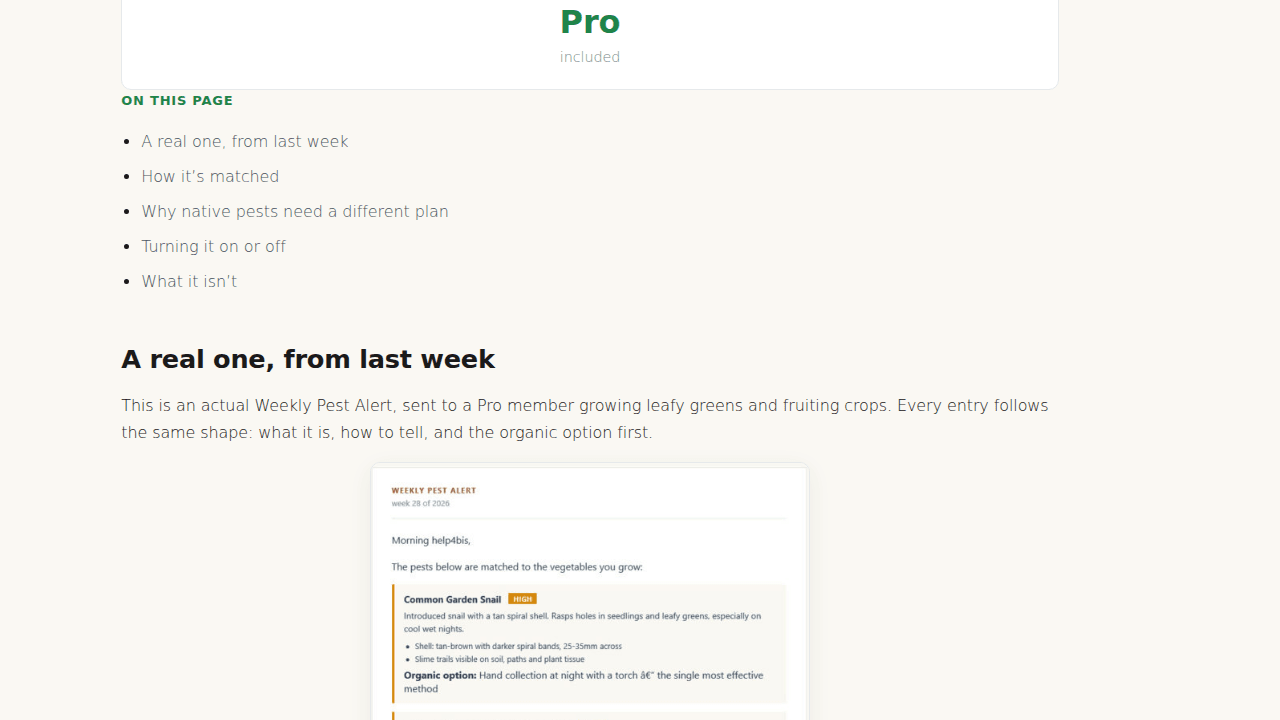
If nothing scores as worth flagging that week, the email says so plainly rather than padding the list with low risk pests just to fill space.
FAQ
Do I need to check both the email and the dashboard?
No. They are the same underlying matching logic on two different schedules. The email is a once a week summary for people who would rather not log in; the dashboard panel is the live, twice a day version. Pro members get both, and can turn the email off from their dashboard email preferences without losing the dashboard panel.
Why did a High risk pest disappear from my dashboard the next day?
Because the panel recomputes from the current forecast twice a day. If the temperature or humidity conditions that pest needs did not hold, its risk drops. That is the system working as intended, not a bug.
What if the pest listed does not affect anything I grow?
Check the “Affects your…” line on the card. If your crops are not listed, it matched on climate zone and season only, not on your specific garden. Add your vegetables in My Garden if you have not already, so future alerts are matched to what you are actually growing.
Is a possum or bird warning the same kind of alert as an aphid warning?
No. Weather-driven pests (insects, fungal disease, molluscs and the like) get the High, Moderate or Low risk label. Protected native animals never get a numeric score, they get a seasonal activity note instead, because the legal response to them is different.
Related features
For the full detail on how the weekly email is built, see the GardenBuddy.au team’s Weekly Pest Alert guide. For how the live daily score is calculated, see the Live Pest Pressure guide.