Knowing the Farmers Almanac exists is one thing. Actually reading it and turning it into jobs in your own garden is another. This is a walkthrough of how we use it ourselves each month, using this September’s Subtropical report as the real example, not a mock-up.
Five steps, one and a half minutes, how we actually read our own almanac.
What this walkthrough covers
The Farmers Almanac itself is explained in full in our Farmers Almanac feature guide. This post skips the tour and gets straight to using it, the five steps we run through every month to turn the report into real decisions for our own beds, checked against the live September 2026 Subtropical page as it stands today.
Why it matters
A monthly report is only useful if you actually read it in the right order. Skim it top to bottom once and most of it will not stick. Read it in the order below and each section feeds the next one, climate context first, then what to plant, then when to plant it by the moon, then what to actually act on this week.
How we read it, step by step
Step one: set your zone, then check the month bar
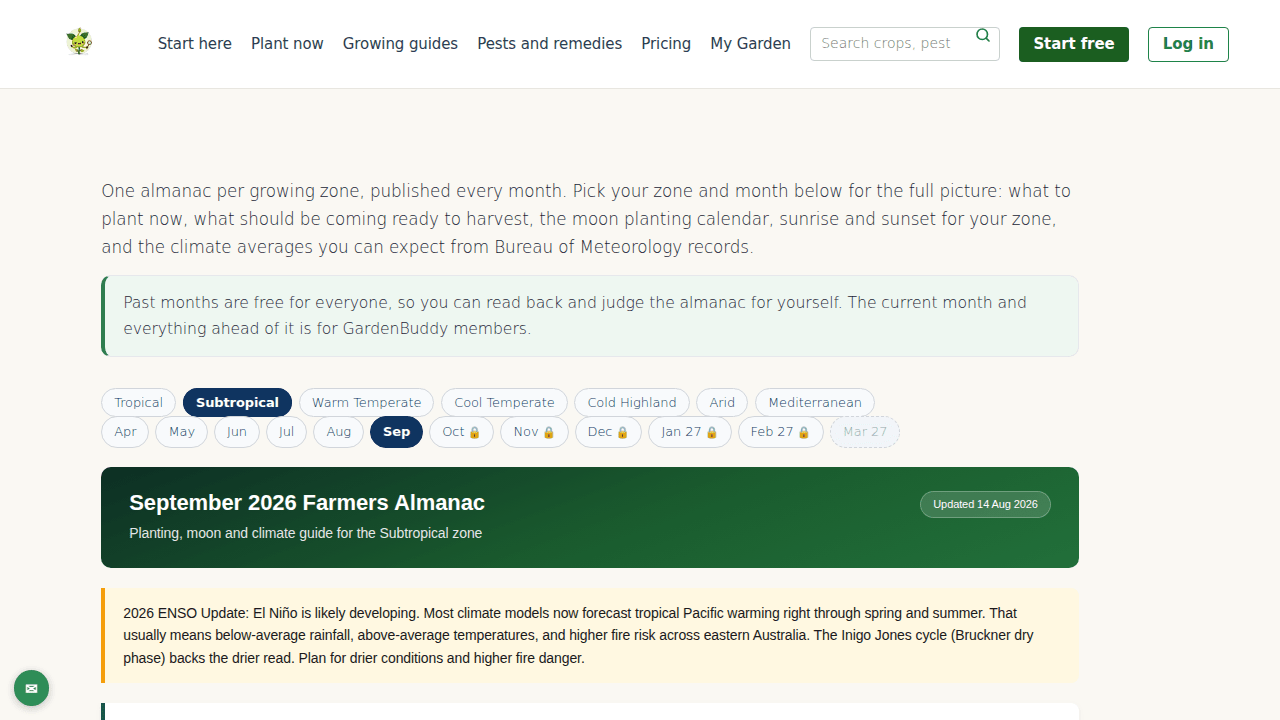
Pick your growing zone from the row of buttons (tropical, subtropical, warm temperate, cool temperate, cold highland, arid or Mediterranean). We checked this on 23 September 2026 and the current month, September, is free to read in full right now, along with every month behind it on the bar. Months ahead show a small lock icon and need a GardenBuddy.au membership to open. We are flagging this ourselves because the page’s own access note still reads “the current month and everything ahead of it is for GardenBuddy.au members”, which does not match what the month bar actually does. Go by what the bar shows you, not that line.
Step two: read the climate overview before you plant anything
The climate table at the top gives you the zone’s expected max and min temperatures and rainfall for the month, sourced from Bureau of Meteorology 30 year averages, plus a plain-English read of the conditions. This September’s Subtropical page has us at 24 to 27°C by day, 14 to 17°C overnight, 35 to 50mm of rain expected, and calls it beautiful spring weather with warm days and mild nights. It also carries a wider seasonal note this month, an El Niño advisory flagging below-average rainfall and higher fire risk into summer. Read that context first, it changes how hard you should lean into the planting list underneath it.
Step three: match the planting guide to the beds you actually have
The planting guide splits into a “Plant Now” list and a “Harvest” list for your zone. Do not try to plant everything on the list, that is not the point. Walk your own garden first, work out which beds are free or about to be, then check them against the list for a match. This September’s Subtropical plant-now list runs to around 80 crops, from beans and beetroot through to tomato, zucchini and several citrus, so the job is narrowing it down to what fits your space, not adding more to a list that is already long. The harvest list tells you what should be coming ready, useful for knowing where a bed is about to free up.
Step four: line the moon planting calendar up against your choice
Once you know what you are planting, check the moon planting calendar for the best window. The table splits the month into waxing and waning stretches and names what each favours, root vegetables and bulbs in one phase, leafy greens in another, fruiting crops like tomatoes and cucurbits in the strongest waxing stretch. This September, the run from the 19th to the 27th is called out as the strongest above-ground planting window, aimed at fruiting crops. Match your step three shortlist to the nearest matching window rather than planting on the first free weekend.
Step five: finish on the key takeaways, not the whole page
If a week is tight, skip straight to the “Key Takeaways” section near the bottom. It condenses the month into the two or three things actually worth acting on, this September that is the spring equinox date, the peak planting window for summer vegetables, and a note that livestock jobs (lambing, calving) are at their busiest stretch. Read the full report when you have the time, but the takeaways are what should end up on your actual to-do list.
FAQ
Do I need to read the whole page every month?
No. Steps one and five alone, checking your zone and month then jumping to the key takeaways, take under a minute and cover the essentials. The steps in between are for when you are actually about to plant or plan.
What if the crop I want isn’t on the plant-now list?
It is outside its planting window for your zone this month. Check the harvest list and the month either side on the bar, plenty of crops have a window that opens the month before or after.
Is the “members only” note on the page accurate?
Not for the current month, as verified against the live page and the plugin logic behind it on 23 September 2026. Past months and the current month are free to read in full for everyone. Only months ahead of the current one need a GardenBuddy.au membership. The page’s own copy has not caught up with that yet.
Related features
- Farmers Almanac, the feature this walkthrough is built on.
- Moon Calendar, every moon phase for your location out to 2027, beyond the almanac’s one-month table.
- Biodynamic Calendar, the method behind the root, leaf, flower and fruit day logic the moon table draws on.
- Traditional Gardening, the hub page linking the moon, biodynamic and companion planting tools together.
Try it now
Open gardenbuddy.au/farmers-almanac/, set your zone, and work through the five steps above against this month’s real report.