One page a month, one growing zone at a time. That is the Farmers Almanac at gardenbuddy.au/farmers-almanac/. We built it to pull the things we already track separately, the weather station data, the planting calendar, the moon phases, the livestock jobs, into one report you can read in one sitting for your own zone. Here is what it actually shows and how to use it.
A minute and a half on what the Farmers Almanac covers and how to read it.
What the Farmers Almanac actually shows
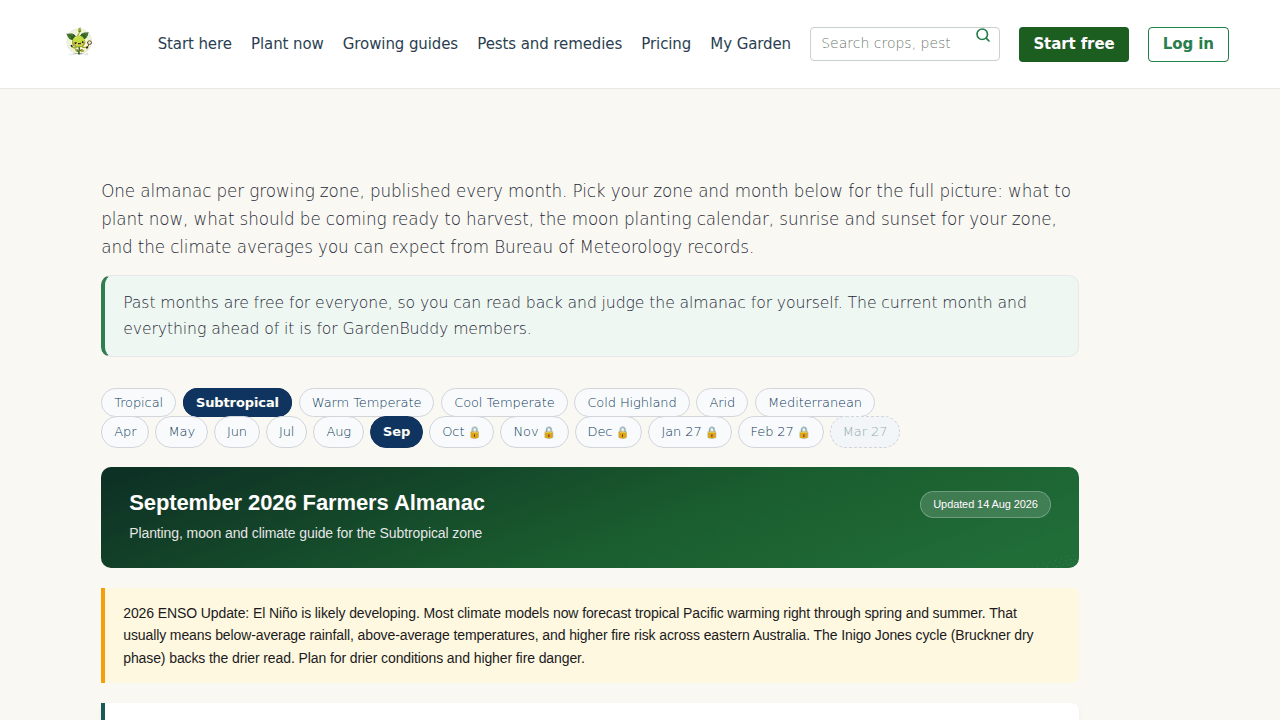
Pick your zone from tropical, subtropical, warm temperate, cool temperate, cold highland, arid or Mediterranean, then pick a month from a rolling window that runs five months back and six months ahead of today. Twelve months on the bar at any time, always anchored on today, not a fixed calendar year.
Each month’s report opens with climate averages for your zone, expected max and min temperatures, rainfall and general conditions, sourced from Bureau of Meteorology records. Under that sits the astronomical events section, the moon phases for the month and sunrise and sunset times for your zone. September’s subtropical page, for what it is worth, has us at 24 to 27°C by day and 14 to 17°C overnight, 35 to 50mm of rain expected, and calls it beautiful spring weather. I cannot argue with that one.
From there it moves into the planting guide, a plant now list and a harvest list specific to your zone, plus a moon planting calendar showing which lunar phases favour fruit, root, leaf or flower crops. A livestock guide lists the month’s jobs by animal, and a “Self-Sufficiency Focus” section ties the month back to food prices and energy use for the season. It closes on a short list of key takeaways, the two or three things worth remembering if you read nothing else on the page.
Two sections only turn up some months, not every one. A scorecard that checks last month’s forecast against what actually happened, and a price cycles section covering commodities in longer cycles. They appear when the team has the data to back them, not as filler.
Why it matters
Most planting advice online is generic. “Plant tomatoes in spring” means nothing useful if your spring runs from a Cairns wet season into a Hobart frost tail. The almanac forces the specifics: your zone, this month, real BOM averages, not a guess that ignores which hemisphere you actually live in. We built it because we were tired of reading advice that assumed everyone gardens where we do, and because a single page beats juggling a weather app, a planting app and a moon calendar printout at the kitchen table.
It also gives you a paper trail. Because past months stay on the site, you can scroll back and check whether last month’s climate advisory actually matched what fell out of the sky, or whether the planting call held up. That accountability is the point, not an afterthought.
How to use it
- Set your zone once: use the zone switcher at the top, it carries your choice into the month links so you are not resetting it every time.
- Check this month first: the current month is free to read in full right now, along with every month behind it.
- Plan a few months out: the forward months on the bar show what is coming so you can order seed or plan beds early. Those ahead of the current month need a GardenBuddy.au Starter membership to open in full, the further months show a locked marker on the nav.
- Use the moon table with the planting list: the moon planting calendar sits right under the planting guide for a reason, line the two up before you commit a weekend to digging.
- Read back for proof: past months are free for everyone precisely so you can judge the almanac’s own track record before trusting this month’s call.
FAQ
Is this the same as the Moon Calendar?
No. The Moon Calendar is a dedicated page that calculates every moon phase for your location out to the end of 2027. The almanac’s moon planting calendar is one section inside a much bigger monthly report, scoped to the current almanac month rather than a lookup covering several years at once. If you want the full multi year phase list, use the Moon Calendar. If you want the whole month’s picture with the moon phases included, use the almanac.
Is this the same as the Biodynamic Calendar?
No. The Biodynamic Calendar is a reference page explaining the Rudolf Steiner method itself, the nine numbered preparations and how root, leaf, flower and fruit days work. The almanac does not explain the method, it applies a simple version of the same fire and earth, water and air logic inside its own moon planting table. Read the Biodynamic Calendar for the theory, read the almanac for this month’s report specific to your own zone.
Do I need an account?
No account is needed to read every past month and the current month in full. A free GardenBuddy.au account gets you further features across the site. A paid Starter membership is what opens the months still ahead of us on the bar.
Related features
- Moon Calendar, every moon phase for your location out to 2027.
- Biodynamic Calendar, the method behind root, leaf, flower and fruit days.
- Traditional Gardening, the hub page linking the moon, biodynamic and companion planting tools together.
Try it now
Open gardenbuddy.au/farmers-almanac/, set your zone, and read this month’s report. It costs nothing to check.